Bank of the West Mobile21.6.0
Publisher Description

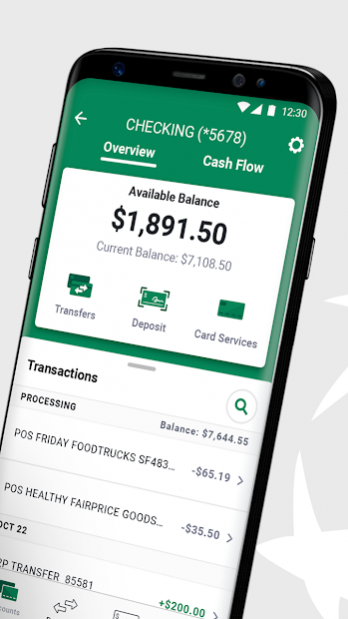


Be the master of your money with the Bank of the West app. Enjoy secure access to your accounts and manage your finances from virtually anywhere.
For your protection: our Android app now has a security feature that analyzes and combats potential risks to your mobile device. To ensure the app is as safe and secure as possible, we will ask for your consent to make and manage phone calls.
BEST-IN-CLASS BANKING
Sign in and bank securely with Fingerprint Sign In, Mobile PIN or password.
Send money, make payments, transfer and deposit funds on the go:
• Quickly send money to almost anyone you know in the U.S. via their email or U.S.
mobile number with Zelle®.
• View or modify scheduled payments and more with Bill Pay. Take a photo of your bill,
and we’ll do the rest.
• Easily move money between Bank of the West accounts and accounts at other banks.
• Deposit checks through the app and email yourself a receipt that has an image of the
check. Also verify and view images of cleared checks.
View and manage your accounts wherever you are:
• Manage your credit and debit cards: set travel notifications, activate new cards,
change your PIN or order a new card.
• Access up to 7 years’ worth of checking, savings, CD and credit card account
statements online. Manage your paperless preferences.
• View account balances and recent transactions without having to sign in using Quick
Balance.
• Quickly look up a transaction without endless scrolling using our search bar. Just type
in first few letter or numbers to activate search.
• Find Bank of the West locations near you with our ATM and Branch Locator.
OUR SECURITY COMMITMENT
We put the safety and security of your personal and financial information first. We:
• Never store confidential information or account numbers on your mobile device.
• Use industry-standard data encryption to protect your transactions.
• Prompt you to verify your sign-in information after 5 minutes of inactivity.
• Block your mobile banking access if your device is lost or stolen.
DISCLAIMERS
The Bank of the West App is available to download at no cost. Your mobile carrier may impose data charges depending on your individual plan. Check with your carrier on specific fees and charges.
Member FDIC. Equal Housing Lender
About Bank of the West Mobile
The company that develops Bank of the West Mobile is Bank of the West. The latest version released by its developer is 21.6.0. This app was rated by 1 users of our site and has an average rating of 5.0.
To install Bank of the West Mobile on your Android device, just click the green Continue To App button above to start the installation process. The app is listed on our website since 2021-08-26 and was downloaded 4 times. We have already checked if the download link is safe, however for your own protection we recommend that you scan the downloaded app with your antivirus. Your antivirus may detect the Bank of the West Mobile as malware as malware if the download link to com.botw.mobilebanking is broken.
How to install Bank of the West Mobile on your Android device:
- Click on the Continue To App button on our website. This will redirect you to Google Play.
- Once the Bank of the West Mobile is shown in the Google Play listing of your Android device, you can start its download and installation. Tap on the Install button located below the search bar and to the right of the app icon.
- A pop-up window with the permissions required by Bank of the West Mobile will be shown. Click on Accept to continue the process.
- Bank of the West Mobile will be downloaded onto your device, displaying a progress. Once the download completes, the installation will start and you'll get a notification after the installation is finished.
Program Details
System requirements
Download information
Pricing
Version History
version 21.6.0
posted on 2021-08-26
Do it your way with this new update. Opt in or out of Debit Card Overdraft Service. Learn about new accounts and app features. And close out feature notifications. Take control and leave a review to let us know how it goes!
